The style Studio
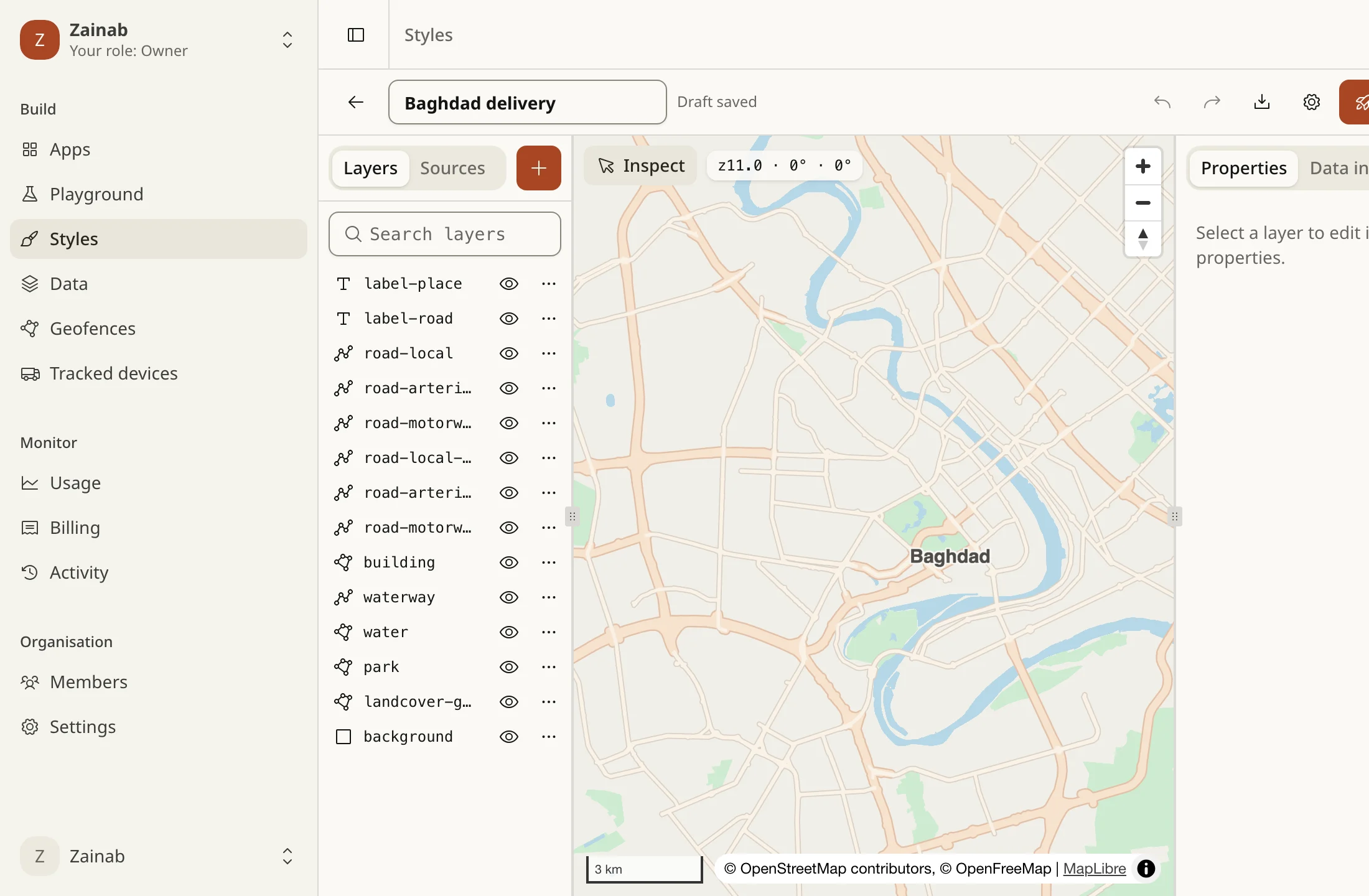
The Studio is the console’s editor for custom styles. Open Styles, then a style. It edits the style as MapLibre JSON, with a form for every property, so what you draw is what the API serves.
- A new style starts from a template, an imported file, or the simple colour editor.
- The simple editor (managed styles: colours, labels and a few switches) has Open in the full editor. It copies the style into a new one, with every layer editable, and leaves the original as it is. The copy counts against your plan’s number of styles.
Start from a template
Section titled “Start from a template”New style opens the gallery. Everything in a template can be edited.
| Template | What it is |
|---|---|
| Light, Dark | The daytime and night basemaps |
| Satellite hybrid | Sentinel-2 imagery with borders and place and road names |
| Navigation day, Navigation night | Wide roads and big names, no buildings or landcover |
| Minimal | Roads, water and city names only: a quiet backdrop for your own data |
| Outdoors | Sand, rock and marshes, relief shading, peaks, borders and paths. The 3D relief appears where elevation data is served |
| Traffic first | A quiet map with live traffic on the roads. Needs a key with traffic access |
The three panes
Section titled “The three panes”- Left: Layers, Sources, Style, Colours, Icons and Fonts. The + button adds a layer.
- Centre: the live map. Inspect turns on the data inspector, and the readout shows zoom, bearing and pitch. When the style has design tokens, a Light / Dark switch previews both.
- Right: Properties of the selected layer, Inspect, History, Comments, Share and Usage.
On a phone the panes are three tabs along the bottom: Layers, Map, Properties. The bar on top has the name, the save state, who else is in the style, undo and redo, export, the style’s settings (public or private, and its URLs) and Publish.
Layers
Section titled “Layers”The list shows the top of the map first. Search it, show or hide a layer, duplicate it, delete it, or move it by dragging or with Alt + Up / Down. A layer with a problem is marked, and Publish stays off until it is fixed.
+ adds a layer by type (background, fill, line, symbol, circle, fill-extrusion, raster, hillshade, heatmap, color-relief) on a source and source-layer of your style. Or open the Ready-made groups tab, the layer catalog: every layer of the basemap’s tiles that the standard map does not draw. A group goes where its kind belongs in the draw order, uses the basemap’s colours, and adding it twice does nothing.
| Group | Draws |
|---|---|
| Land use | Residential, commercial and industrial areas, schools, hospitals, cemeteries, pitches |
| Sand, rock and wetland | The Western Desert and the southern marshes |
| Airports | Runways, taxiways and aprons |
| Railways | Railway and metro lines above ground |
| Paths and footways | Footways, cycleways and steps |
| Ferries | Ferry routes over rivers and the Gulf |
| Administrative boundaries | Country borders (disputed ones dashed) and governorate borders |
| Country and governorate names | Names at small scales |
| Villages, neighbourhoods and islands | Names below town level |
| Water names | Lakes, bays and rivers |
| Park names | Parks and reserves |
| Points of interest | Small dots with names, most important first |
| Mountain peaks | Names with their height in metres |
| House numbers | At the closest zoom |
| 3D buildings | Buildings extruded to their height when the map is pitched |
| Live traffic | Needs a key with traffic access; not drawn in static maps |
| Air quality | Circles by index, 1 to 5; not drawn in static maps |
| Hillshade | Relief shading, where elevation data is served |
Properties from the style spec
Section titled “Properties from the style spec”The property forms are generated from the MapLibre style specification, so every layer type has every paint and layout property, with the right control (colour, number with its range and unit, choice, switch, list), its default, and whether it may change with zoom or with data. Search them, show only the ones you set, and reset one to its default.
Layer filters, minzoom and maxzoom are on the same panel. The source-layer of the basemap source is picked from its TileJSON.
Expressions
Section titled “Expressions”Next to every property that can vary is an expression button. It opens two tabs:
- Visual builds the value from forms. It offers only what the property allows:
- a constant;
- a curve over zoom or over a feature field:
interpolate(linear, exponential with a base, or cubic-bezier; colours also inrgb,hclorlab) orstep, with a stop list and a live preview of the curve; - match: a field’s values to values, with a fallback;
- case: conditions to values, with a fallback;
- coalesce: the first of several fields or values that exists.
- Code holds the JSON itself and checks it with the style spec’s own validator as you type, with the message at the error.
["interpolate", ["linear"], ["zoom"], 10, 1, 16, 6]A value the forms cannot express opens on Code and is never rewritten. The filter builder works the same way: rows of field operator value with ==, !=, in, !in, >, >=, <, <=, has and !has, joined by all or any, with one level of nesting.
Design tokens
Section titled “Design tokens”The Colours tab holds named colours, each with a light and a dark value. A name is letters, digits, _, . and -, up to 40 characters. Pick a token from any colour property and the editor writes token(name) there. When the style has tokens, the map has a Light / Dark switch that previews either set, and the tab shows where each token is used.
token(name) exists only inside the editor. The saved draft, the published style and the export carry the light literal colours, so there is one set of colours in what the API serves. The tokens and their dark values stay in the draft’s metadata["tareky:tokens"], and the references come back when you reopen it. For a dark map, keep a second style.
Sources and the data inspector
Section titled “Sources and the data inspector”Sources lists the style’s sources with their type, URL and how many layers draw each. Add offers the names our servers answer, tareky://basemap, tareky://satellite, tareky://terrain, tareky://traffic and tareky://aqi, and each of your vector tilesets. A source that layers use cannot be removed.
Inspect is the data inspector. Turn it on and click the map: for each feature under the click you get its layer, its source and source-layer, and every property. Open layer jumps to the layer that draws it.
Scene: camera, terrain, light and sky
Section titled “Scene: camera, terrain, light and sky”The Style tab sets the opening camera (Use the map’s position), the projection (mercator or globe) and the 3D scene:
- 3D terrain: a switch, the elevation source (a
raster-demsource) and the exaggeration, 0 to 5. - Light: anchor (
viewportormap), intensity 0 to 1 and colour. - Sky: sky, horizon and fog colours and their blends.
Static maps and raster tiles do not draw terrain, sky or projection: see custom styles.
Saving, undo and conflicts
Section titled “Saving, undo and conflicts”- Autosave: the draft is saved 800 ms after your last change, one save at a time. Undo and redo are
Ctrl/Cmd + ZandCtrl/Cmd + Shift + Z(orCtrl/Cmd + Y). - Revision: every save carries the revision it was made from. If the draft moved since you opened it (another tab, a teammate), the API refuses the save with 409
stale_revision, the bar says so, and Publish is off. Nothing is overwritten, and nothing is merged: reload, and redo what you need. - Someone else saved or published: the bar names them and offers Reload. Your editor keeps its own draft until you reload.
- A save checks only the style’s size. Layer problems show in the editor, and Publish checks everything.
Versions
Section titled “Versions”Publish checks the whole style (the spec, our rules, the fonts and tilesets you name), draws a test image with our renderer, and makes a numbered version, with an optional note of up to 200 characters. Maps load the published version. A style that fails is refused with the reasons (style_invalid, style_unrenderable).
The History tab lists the versions, newest first:
- Compare with draft shows what changed, by layer: added, removed, moved and, for the rest, which property changed from what to what, then sources and style-wide keys. Layers are matched by id, so adding one does not mark every layer below it.
- Restore as draft copies a version into the draft. The published version does not change. It bumps the revision, so an editor with the old one open is told.
- Roll back to it makes a version the live one and leaves the draft as it is.
Share links
Section titled “Share links”The Share tab makes a read-only link to the draft, for someone with no access to your console: a client, a designer. Choose how long it lasts (1 hour, 1 day, 1 week or 1 month; never more than 30 days) and add a note. You can have 10 live links per style, revoke any at once, and see how many times each was opened.
GET https://api.tareky.com/v1/styles/preview/{token}The answer is the draft as a MapLibre style, so any map can load it. It needs no key and is not billed.
style: 'https://api.tareky.com/v1/styles/preview/tsl_…'- A link that is unknown, expired or revoked, a deleted style, or a draft that is not valid right now all answer 404, with no way to tell which.
- It never has live traffic or your own icons (icons are built when you publish), and it draws only your organisation’s built tilesets.
- It is not cached, because a draft changes.
Comments and who is here
Section titled “Comments and who is here”The Comments tab holds notes on the whole style or on the selected layer, up to 2,000 characters each and 500 a style. Anyone who can view the style can comment. Editors resolve and reopen them. You delete your own, and editors delete any.
Avatars on the bar show who else has the style open and on which layer (hover to see it, click to jump to it). A person drops off 30 seconds after their editor stops answering (a hidden tab stops answering).
The Usage tab shows which keys loaded the style in the last 7, 30 or 90 days: per key, the loads of the style JSON and the maps drawn from it (static maps and raster tiles), and per day. Counting starts from when the Studio shipped, a deleted key stays in the list as revoked, and a style opened through a share link is not counted, since it has no key. Use it to check that nothing depends on a style before you change or delete it.
Import and export
Section titled “Import and export”Import takes a style file in the Styles list.
- A MapLibre style is used as it is and checked against our rules.
- A Mapbox style you own is converted, and a report tells you what changed before anything is created. We never fetch anything from Mapbox: its tiles, sprites and fonts are not ours to use, so import only styles you own.
| Converted | Dropped, and said in the report |
|---|---|
Mapbox vector tiles become our basemap, and layer names are remapped to its layers (a best effort: field values such as class may need adjusting) |
Sources on a server of their own, or without inline data, and the layers that drew them (upload the data as a tileset) |
| Mapbox satellite becomes our satellite | Icons from the Mapbox sprite (upload your own); the layers that used them are listed |
| Inline GeoJSON is kept | fog, terrain, lights, models, camera and featuresets |
| Fonts become Noto Sans with Arabic (bold if the name looks bold) | Layer types we do not support (3D models, slots, clips, particles) |
name, center, zoom, bearing, pitch, transition; globe or mercator projection |
Properties MapLibre does not know, and values the style spec rejects |
| Mapbox Standard styles (built from imports): export a classic style instead |
Export (the bar’s download button) saves the document as you edit it: JSON, with literal colours and the tareky:// names. Importing it again works as it is.
Limits by plan
Section titled “Limits by plan”The numbers come from your plan. An organisation gets the best of its apps’ plans, and never less than the free plan’s:
| Free plan | |
|---|---|
| Styles | 2 |
| One style’s size | 1 MB |
| Layers in a style | 300 |
| Icons in a style | 64 |
| Fonts | 3 |
Tilesets have their own limits. A style that is over a limit is refused when you save it (size) or publish it (all of them), with the number.
Who can do what
Section titled “Who can do what”| Action | Role |
|---|---|
| Open styles, history, comments, usage; comment | everyone in the organisation (styles.view) |
| Edit the draft; icons, fonts and share links; create, import, duplicate and delete styles; resolve comments | owner, admin, developer (styles.manage) |
| Publish, roll back and restore a version | owner and admin (styles.publish) |
The server enforces this: a developer who tries to publish gets 403 role_forbidden. Billing members can open styles and comment, not edit them.